
If you're shipping to customers in the EU, you'll need to provide additional information to identify the products in your shipments in order to comply with EU customs regulations.
Product Identifiers (PIDs) are unique codes used to identify specific products. They help customs authorities verify shipment contents, improve product traceability and facilitate customs clearance.
There are three types of Product Identifiers:
Do I need Product Identifiers to ship to the EU?
Yes! Product Identifiers are required for shipments entering any of the 27 EU member countries, regardless of shipment value.
When preparing an EU-bound shipment with Chit Chats, you'll need the following information for each item:
Merchant PID : Required. Your unique product reference or SKU used to identify the item in your inventory.
Manufacturer Product ID (Non-Standardized Manufacturer PID): Required. A model number, part number or product code assigned by the manufacturer.
GTIN / EAN / UPC / ISBN (Standardized Manufacturer PID): Optional. An internationally recognized product identifier, if available.
Although some products fall under special categories, Chit Chats cannot currently identify these categories automatically. As a result, the required Product Identifiers must be provided for all items shipped to the EU through Chit Chats, including handmade products, antiques and artwork.
Where can I find my Product Identifiers?
You may already have the required information available in your product catalogue!
SKU (Merchant PID)
Check your online store, marketplace listings or inventory management system for the SKU or internal reference number assigned to your product.
Manufacturer Product ID (Non-Standardized Manufacturer PID)
Look for the manufacturer's model number, part number or product code on the product packaging, supplier documentation or manufacturer's website.
If you're unsure where to find this information, we recommend contacting your manufacturer or supplier.
GTIN / EAN / UPC / ISBN (Standardized Manufacturer PID)
These identifiers can often be found on product packaging, barcodes or in the product's specifications. Remember, this field is optional! If you do not have the information available, please leave the field blank.
How do I add Product Identifiers to my Chit Chats shipments?
You can enter or update Product Identifiers in the following areas of your account:
Shipment details
If using CSV fields:
- sku_code
- manufacturer_internal_id
- manufacturer_global_id
When shipping to the EU ensure that the following fields are filled:
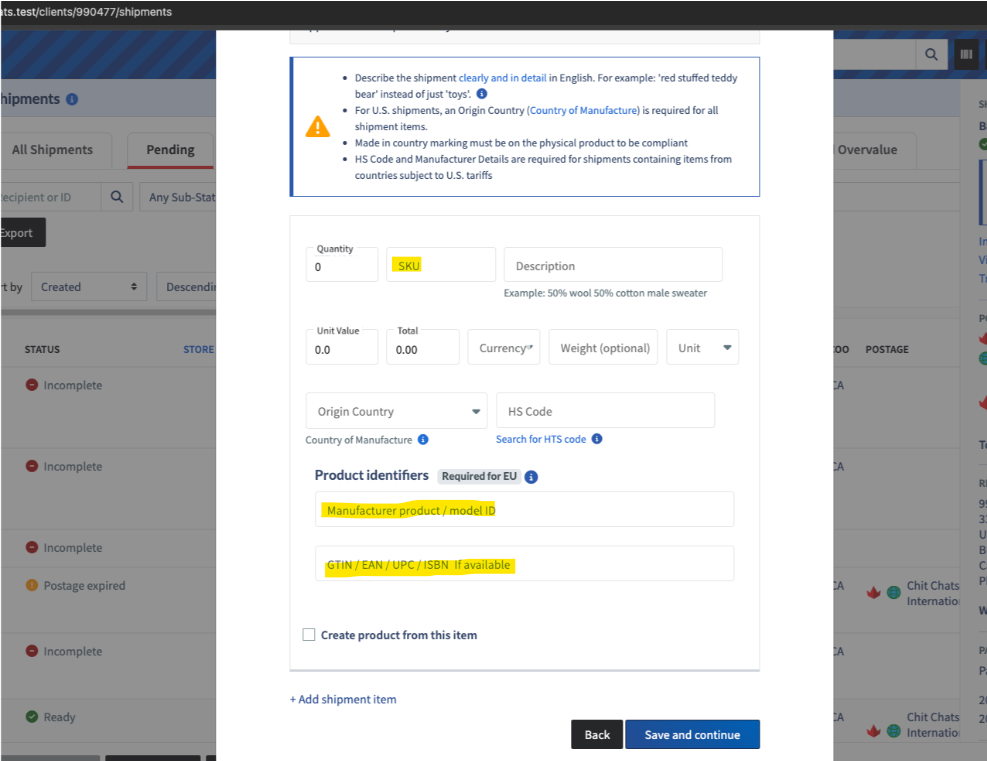
SKU: For the Merchant PID (M-PID), enter a SKU or internal product reference number.
Manufacturer Product ID* (manufacturer_internal_id): Enter the product identifier assigned by the manufacturer, such as a model number or part number
GTIN / EAN / UPC / ISBN* (manufacturer_global_id): Optional, enter your product's standardized identifier, if available.
*Fields have a maximum limit of 70 characters.
Frequently Asked Questions
I sell books. Where can I find my SKU and Product Identifiers?
Books generally have an ISBN (International Standard Book Number), which can be found on the back cover or copyright page. However, an ISBN is not the same as a SKU or Manufacturer Product ID.
Important: An ISBN does not replace the required SKU or Manufacturer Product ID fields when creating EU-bound shipments with Chit Chats.
What if my product doesn't have a Manufacturer Product ID?
Not all products have an existing Manufacturer Product ID, especially handmade goods, books, vintage items, or products from smaller suppliers.
According to official EU customs guidance, if a Non-Standardized Manufacturer PID (NS-PID) does not already exist, the manufacturer, producer, or product supplier is expected to assign one. There is no specific format or structure required for this identifier!
If you're the manufacturer, you can assign your own identifier.
For vintage items or other products where you've checked and confirmed that no manufacturer-assigned identifier is available, you can use your SKU in the Manufacturer Product ID field.
What should I enter for the Product Identifiers (PIDs) when shipping trading cards?
Sealed trading card packs or sets
SKU: Use the SKU from your online store or create your own.
Manufacturer Product ID: Enter the manufacturer's product or model number. For Upper Deck products, this is typically a five-digit number on the outer packaging, which may correspond to the last five digits of the UPC.
GTIN / EAN / UPC / ISBN: Enter the product's barcode number, if available.
Individual trading cards, loose cards, or assorted cards
Individual or loose trading cards may not have a Manufacturer Product ID or standardized barcode, as these are often assigned to sealed products.
SKU: Use the SKU from your online store or create your own.
Manufacturer Product ID: If no manufacturer-assigned identifier is available after checking, you can use the same SKU.
GTIN / EAN / UPC / ISBN: Leave blank if no standardized identifier is available.