
Manufacturer information refers to the details of your product’s manufacturer (i.e. the location where the product was created). With the introduction of U.S. tariffs in early 2025, this information is required only for USPS DDP postage (Chit Chats U.S. Edge, U.S. Select, etc) when shipping products with a Country of Origin (COO) subject to these tariffs.
If your product is eligible for CUSMA, the manufacturer information must match with the information that you have submitted to be eligible.
THIS ARTICLE COVERS:
- Requirements for Purchasing DDP Postage
- Where Can I Find Manufacturer Information?
- What if My Goods are Handmade?
- Shipment Creation
- CSV Fields
Requirements for Purchasing DDP Postage
To purchase USPS DDP Postage, shipments must be cleared through a broker. U.S. Customs and Border Protection (CBP) requires additional details to ensure that the applicable taxes and duties are accurately assessed. A key requirement is Manufacturer Information, which includes:
Manufacturer ID
Manufacturer Name (Company or Person) (35 characters maximum)
Manufacturer Street Address (35 characters maximum)
Manufacturer City (17 characters maximum)
Manufacturer Province (9 characters maximum)
Tip: Do not put the province code into postal code area
Manufacturer Country (Must be the same as the Country of Origin)
If you don’t have the manufacturer’s information, please do not enter placeholders such as 'Unknown' or 'N/A.' Doing so will result in delays and your shipment being returned.
Where Can I Find Manufacturer Information?
If you source your products directly from the manufacturer, this information may already be available on invoices, their website, packing slips, or other documentation they provide. If not, you can request it from them directly.
If you purchase from a reseller, distributor, or third-party vendor, they may have access to the manufacturer details and can provide them upon request.
If you know the manufacturer, but do not have any details, we recommend using this resource to find additional information.
Note: the above resource is only a suggestion and you may require additional resources to find specific information.
What if I Can't Find the Manufacturer Information?
If you are unable to locate or find your manufacturer information, we suggest that you use instead Chit Chats International Tracked to the U.S. This service does not require any manufacturer details, but there is no return service and doesn't factor in CUSMA duty-free treatment. However if you would like to use USPS and/or have a return service, you may use USPS DDP services under certain scenarios:
1. If you source your goods from a wholesaler, you may list the wholesaler as the manufacturer only if you have documentation showing that the wholesaler refuses to provide the actual manufacturer’s details. U.S. Customs permits this exception when a wholesaler declines to disclose manufacturer information.

2. If you would like to ship a non-textile product in which you do not know the manufacturer information, you can use your own Canadian address as the manufacturer. Nevertheless, you must declare the Country of Origin (COO) as what is printed on the item.
What if My Goods are Handmade?
If you create your own products and do not source them from a manufacturer or reseller, you can list your business as the manufacturer.
What is Manufacturer ID (MID)?
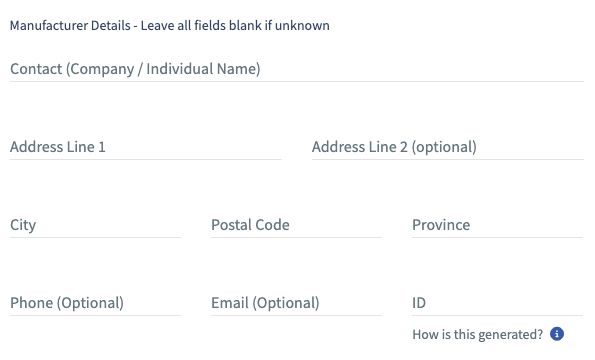
A Manufacturer ID (MID), is required for customs clearance when shipping under DDP (Delivered Duty Paid) postage and is an alphanumeric identifier used by U.S. Customs and Border Protection (CBP) to track the origin of imported goods. The platform automatically generates a Manufacturer ID (MID) for you when manually creating shipments, using the information you provide in the applicable fields (business name, location, and country). Learn more about MID
Note: The Manufacturer ID field is not visible during shipment creation. However, the Chit Chats platform automatically generates and stores this information for each shipment.
When manually creating shipments, you will encounter the following fields for manufacturer details. These fields are only required for DDP U.S. postage. The MID is automatically generated based on the Manufacturer's Contact, Address Lines, and Country of Origin. You can always override the generated value by entering your desired MID after completing all other manufacturer details before saving.
CSV Fields
If you are importing using CSV files, please note that our Advanced CSV template has been updated as of 2025 to include the following fields:
Note: the character limits also apply to other forms of importing as well.
item_manufacturer_contact - 35 chars (required)
item_manufacturer_address_1 - 35 chars (required)
item_manufacturer_address_2 - 35 chars (optional)
item_manufacturer_city - 17 chars (required)
item_manufacturer_postal_code - 9 chars (required)
- China requires a minimum of 6 digits
- Canada requires an alternating number and letter
- U.S. requires a minimum of 5 digits
item_manufacturer_province_code - 9 chars (required)
item_manufacturer_country_code - 2 chars (optional)
Used if the Manufacturer country is different from the product's country of origin (only in the cases of specific scenarios where refused or non-textile product where it is unknown.
If left blank, the platform will default to the country of origin for the product
Note: Required fields are necessary for DDP U.S. postage only, and are optional for all other postage types.
API
We recently introduced a manufacturer_country_code field in the Chit Chats API. If applicable to your product data, please update your integration to include this field in shipment requests. If this value is omitted, we’ll continue to default to the origin_country field. API documentation reference