Canada-United States-Mexico Agreement (CUSMA)
CUSMA, also known as the Canada-United States-Mexico Agreement, is a free trade agreement that replaced NAFTA in July 2020. CUSMA provides preferential, duty-free treatment on specific goods that meet the rules of origin, determining the extent of North American production required for a product to be considered.
CUSMA-approved products are not eligible when shipped through Chit Chats International Tracked to the U.S. These shipments will still be subject to applicable tariffs. To benefit from the CUSMA agreement, please use USPS-based DDP postage options such as Chit Chats U.S. Edge or Chit Chats U.S. Select.

If the shipment is subject to Section 232 tariffs, the agreement will not apply, no matter the postage used.
How to Check if Your Item Qualifies
You can determine if your product qualifies under CUSMA by:
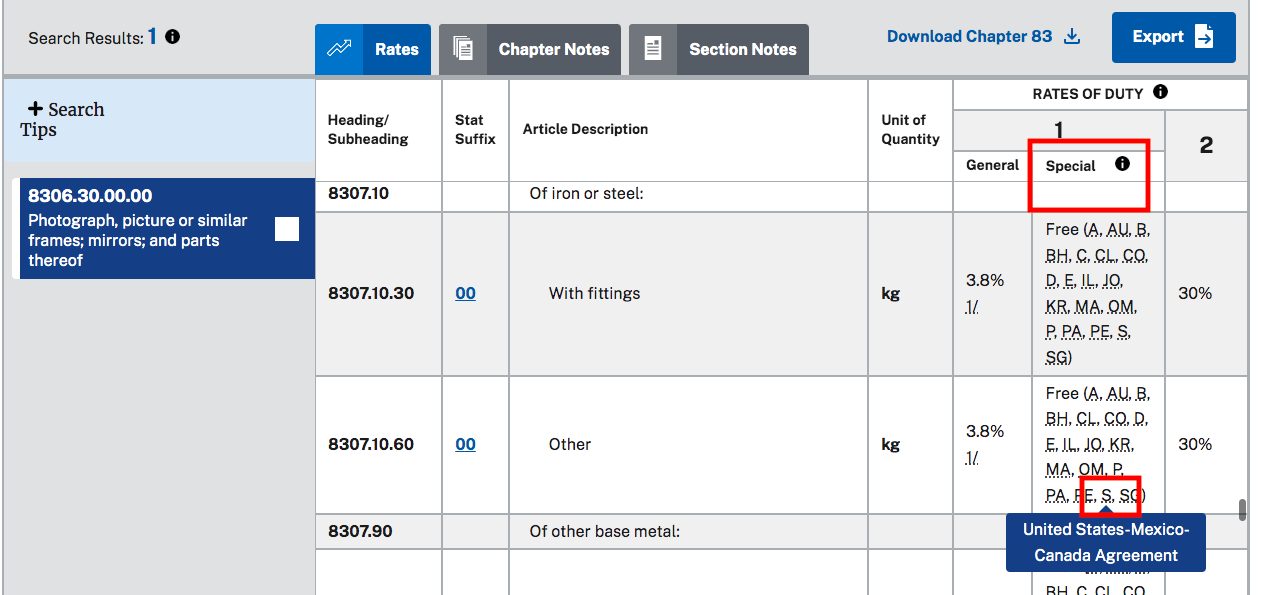
- Looking up your 10 digit HTS Code (Harmonized Tariff Schedule) on the official US site here
- Check the Special Rate column — if you see “S” or “S+”, your product may qualify for CUSMA duty-free treatment OR if it shows Free in the General Duty column.
- If the item is not eligible under CUSMA, for country of origin Canada, you will see base rate duty + Canada blanket tariff.
CUSMA applies to countries of origin being Canada, the U.S., and Mexico. Determine the COO of your product HERE. How to label COO.
How to submit CUSMA certification
To access preferential, duty-free treatment and exemption from blanket tariffs (as applicable) on CUSMA eligible items:
- Submit the required details through your Chit Chats account (Settings/ Shipping / Manage CUSMA).
- This must be done for each eligible HTS Code.
- Once your submission is approved, you'll receive an email notification, and the preferential duty-free rates will automatically appear when you purchase DDP postage for that HTS Code.
- After submission and there are no errors, please expect same day approval.
NOTE: CUSMA Certification is done by product (country of origin and HTS code) - not by shipment and not by SKU. A product can have different prices or sets but as long as it has the same 10 digit HTS code and country of origin for a CUSMA approved product, you only need one certification for that product. Our system will automatically calculate it as CUSMA approved.

Validity is for one year and done by product. If you would like to add any other additional products, simply submit a new request.
Please follow the steps below:
Go to Settings > Shipping > CUSMA Certification to fill out your CUSMA form. Remember to sign the CUSMA pdf before submitting to Chit Chats. You can now sign digitally with our e-sign feature.
After submission and there are no errors, please expect same day approval.
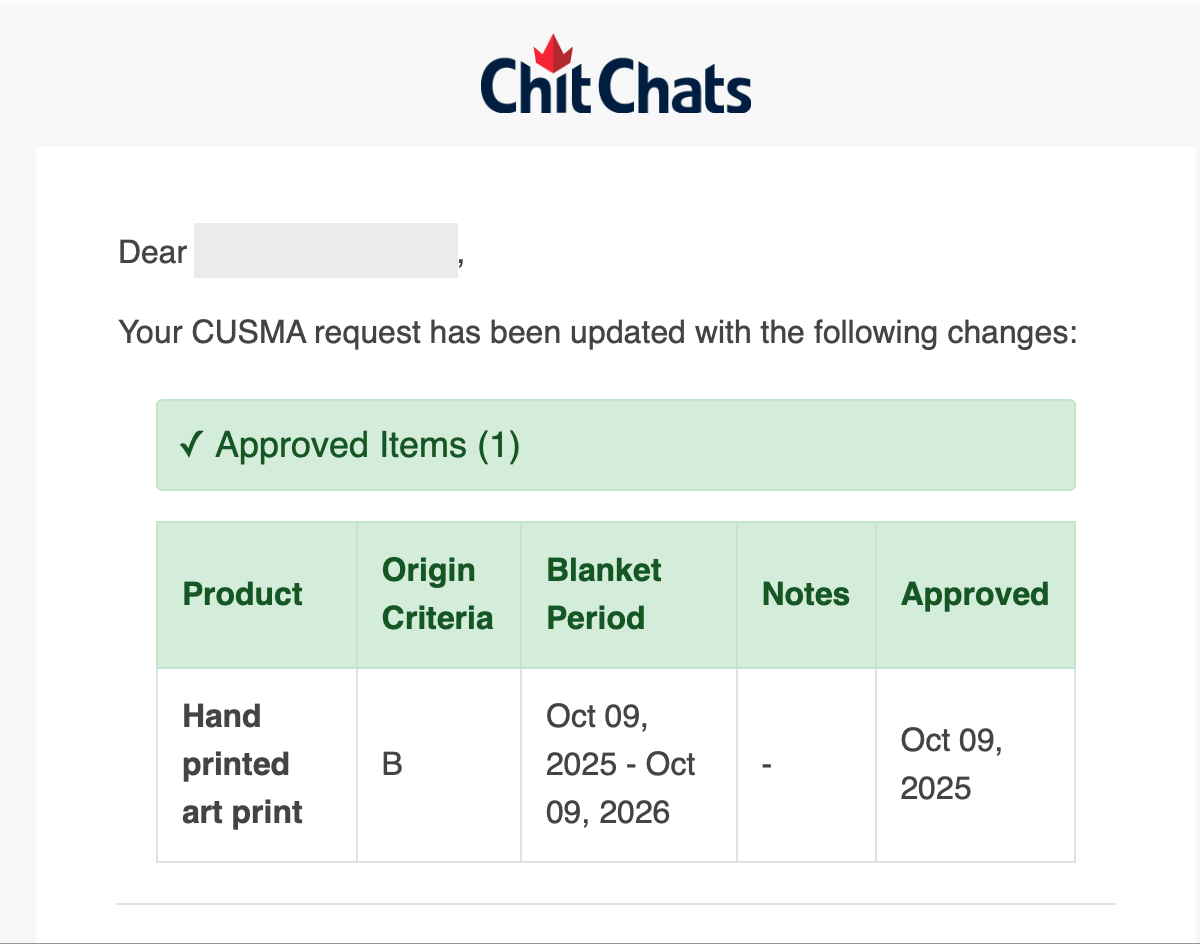
Once your submission is approved, you'll receive an email notification, and the preferential duty-free rates and exemption from blanket tariffs (as applicable) will automatically appear on our platform when you purchase DDP (delivered duties paid) postage (the only postage available for U.S. shipments that are CUSMA approved - duties will be exempt) for that 10 digit HTS Code and country of origin.
Email subject line title: "CUSMA Request Updates - [Client] Request #####"
Body of email
When dropping off or sending shipments to Chit Chats, it’s not mandatory to attach the CUSMA document to your package. Learn more.
Please ensure shipments are properly labelled with Country of Origin (COO).
Important things to consider
Validity is for one year and done by product. If you would like to add any other additional products, simply submit a new request.
To ensure your shipment qualifies for the benefits of CUSMA (once approved), the following requirements must be met:
the Country of Origin must match what was declared on the CUSMA application.
the HTS code must match what was declared on the CUSMA application.
the manufacturer country must match the manufacturer country that is declared on the CUSMA application.
the Country of Origin and the Manufacturer country must match. For example, if the Country of Origin is the U.S., the manufacturer information must be from an American address.
No refunds or credits will be issued for duties/reciprocal tariffs if postage is purchased before CUSMA approval. You can void any unused postage and repurchase after approval to see the exemptions.
Here are common CUSMA related frequently asked questions.
Reference this step by step tutorial for more information on how to submit your CUSMA Certification:
Note that we have implemented a digital signature to eliminate the need to download, sign and upload the certification form as noted in the video below. If you have already begun the process, please ensure you digitally sign on the 'basic information' step.
Additional Fees
Even if the item is duty- free under CUSMA there will be other fees associated to the shipment which is outlined below
Tariff (reciprocal tariffs may still apply depending on the item)
Customs Processing fee - is a flat fee (1.35 USD flat fee*) per shipment, covering administrative costs for informal entry into the U.S.
Broker Line Item fee - is the fee for our broker to process the individual line items in the shipment (0.15 USD / line item*). Example: You are shipping 1 tshirt, 2 mugs and 3 pen = 3 shipment items
Read more about CUSMA Certification and how it may affect you here.
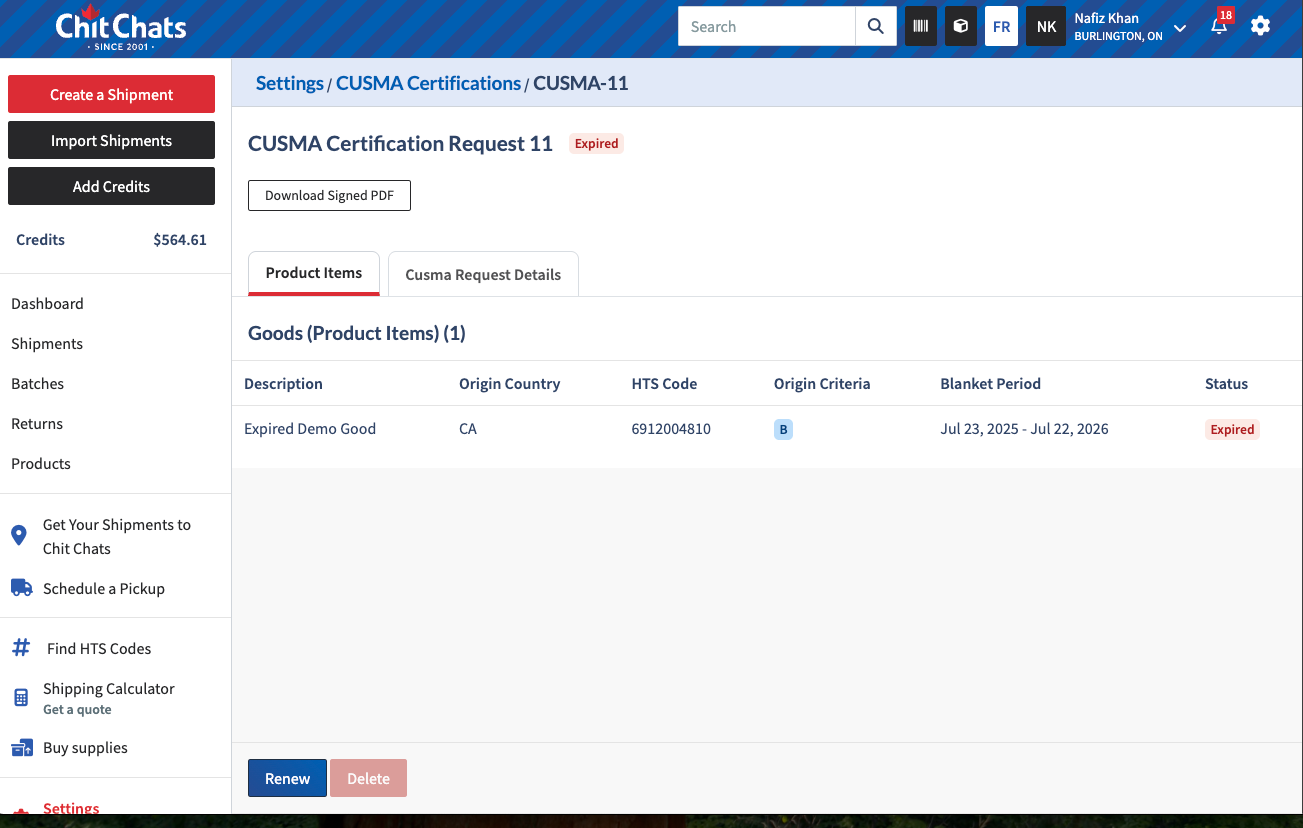
Manage and Renew Your CUSMA Certificates
Renewing your CUSMA certificates is quick and easy. We have tools to help you keep track of your certificates, understand their status, and manage renewals more efficiently.
To avoid interruptions to your CUSMA benefits, keep your account email address up to date. We'll automatically send dashboard and email reminders two weeks before your certificates expire, giving you plenty of time to renew.
1. Review your certificates
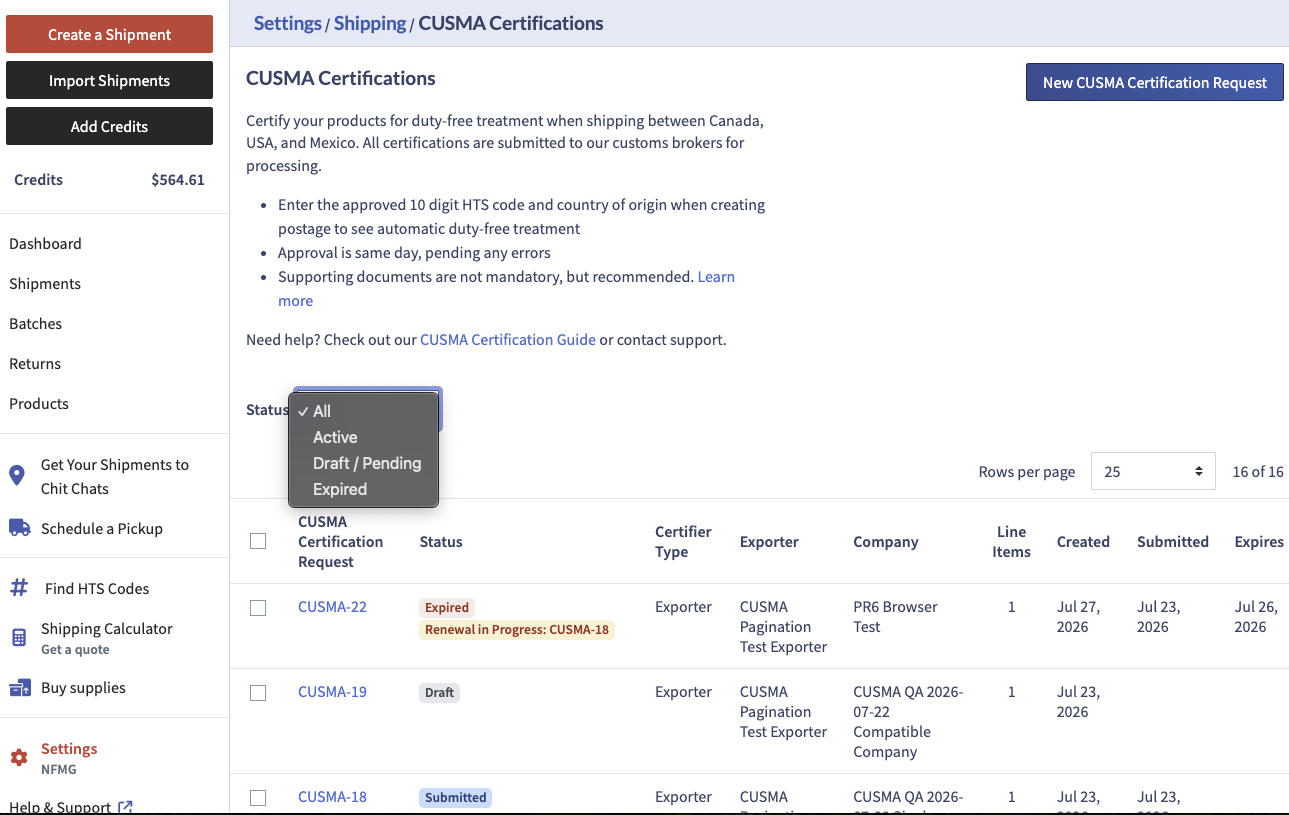
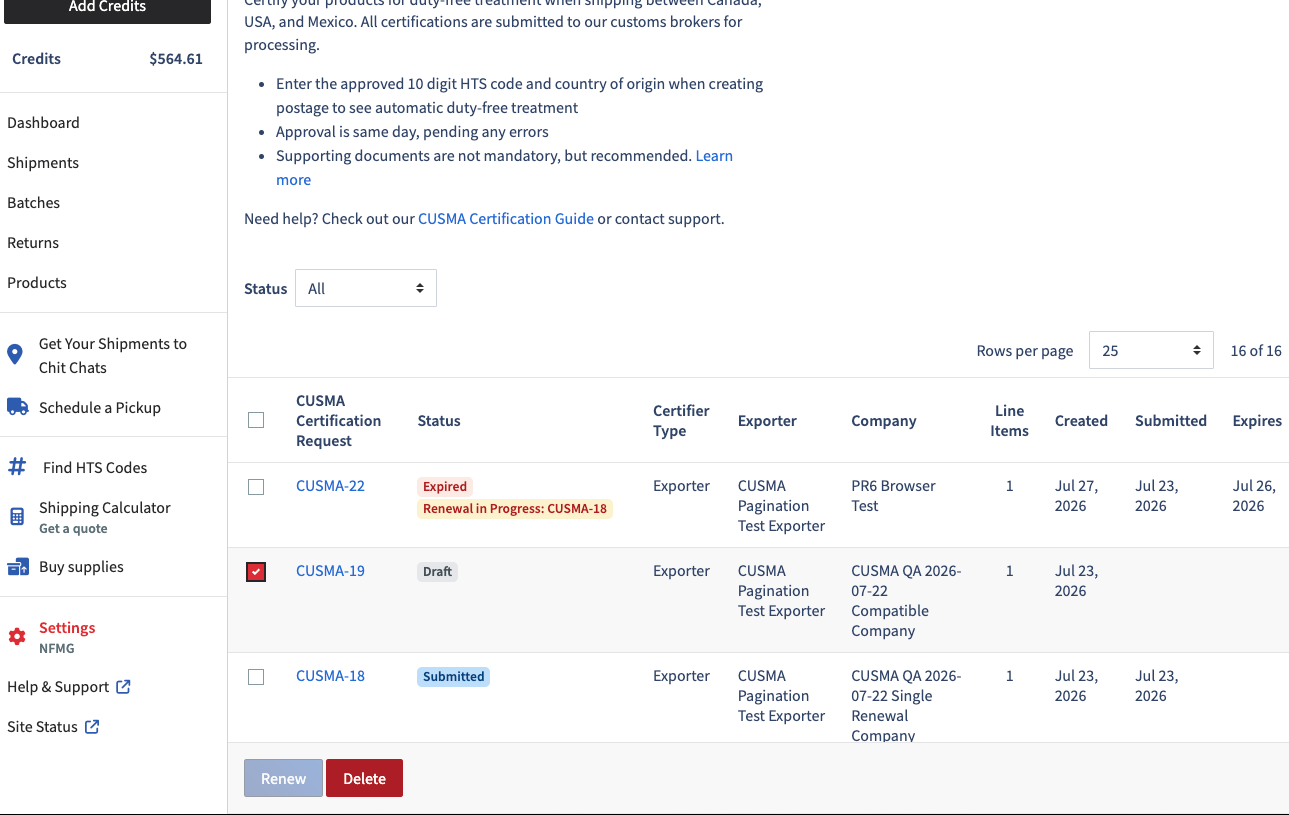
While on the CUSMA page in your Chit Chats account, you will see the certificate table. From here, you can view:
Exporter
Company name
Submission date
Expiry date
You can also filter your certificates by status:
Active
Draft/Pending
Expired
2. Understand certificate statuses
Status badges make it easier to see where each certificate is in its lifecycle.
3. Delete draft certificates
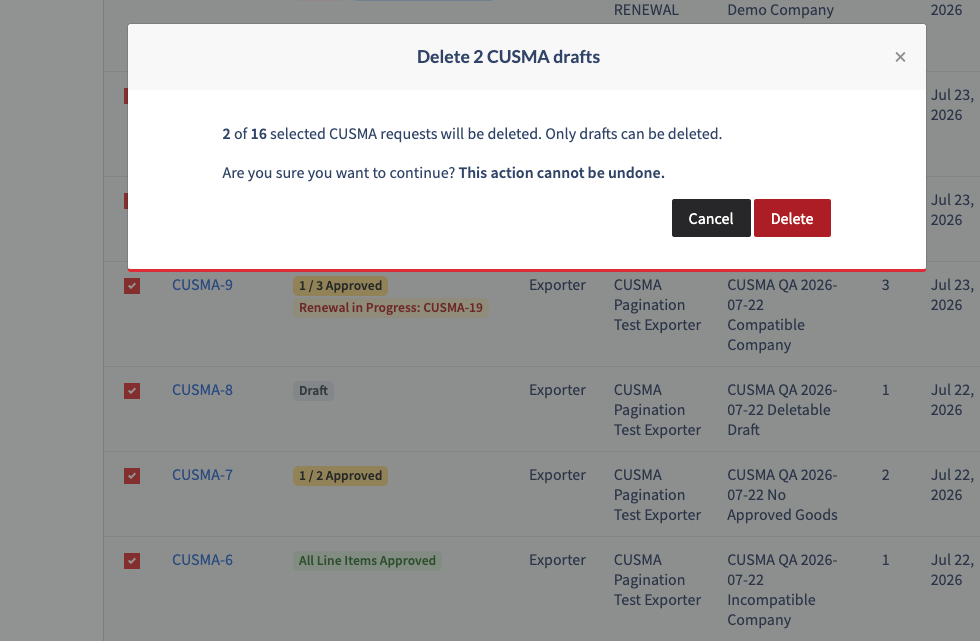
You can select one or more drafted certificates directly from the certificate table and delete them in a single action.
Please note:
Only drafted certificates can be deleted.
Submitted or processed certificates cannot be deleted.
4. Renew or combine certificates
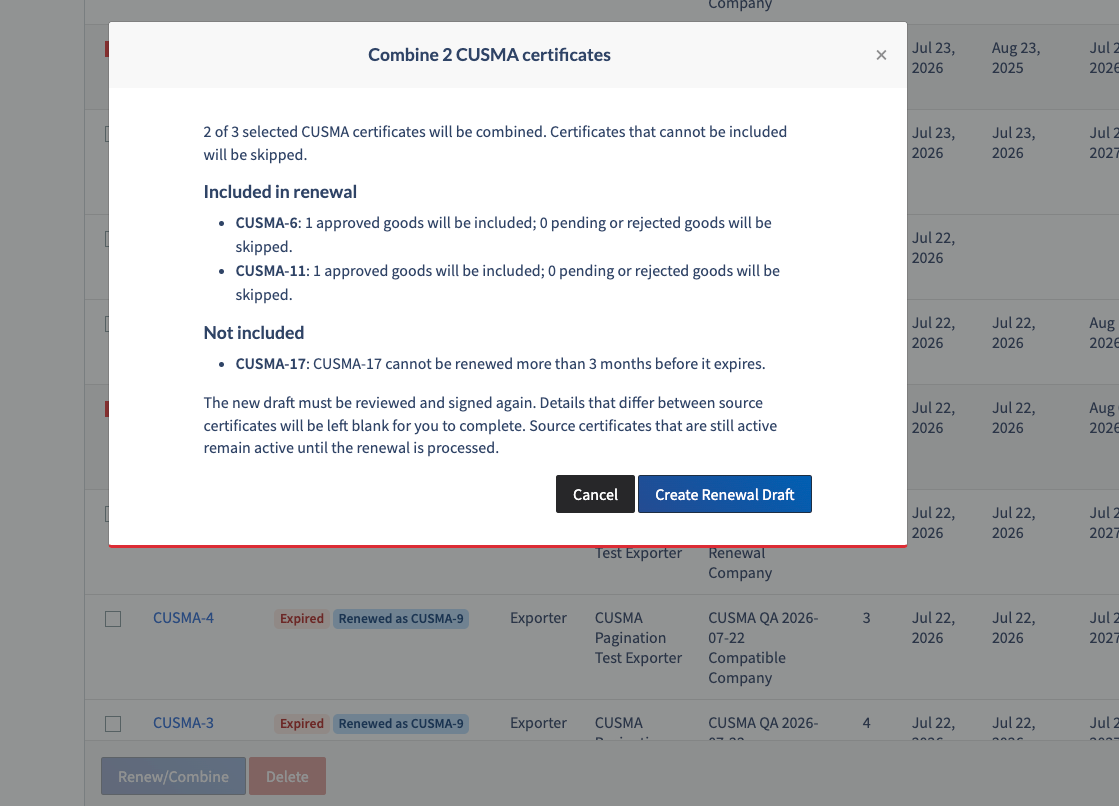
When one or more certificates become eligible for renewal, you can select them and choose Renew/Combine.
Only if multiple certificates share the same exporter, certifier, and certification details, they can be combined into a single renewal to simplify future certificate management.
Before creating the renewal, you'll see a summary showing:
Which certificates will be included
The number of approved goods that will be copied
Any pending or rejected goods that won't be included
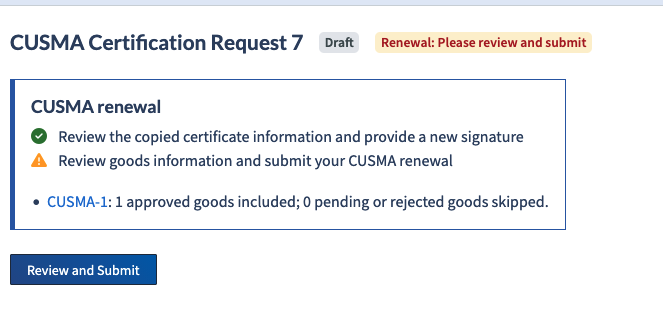
After confirming, a renewal draft is created automatically. Review the copied information, update any required details, and sign the certificate before submitting it.
5. Submit your renewal
Once your renewal is submitted, it is automatically reviewed in relation to the current tariff rules.
While your renewal is being processed:
Your existing certificate remains active.
Eligible shipments continue to receive CUSMA preferential tariff treatment.
After processing is complete:
The renewed certificate becomes your active certificate.
Previous certificates move to Expired status and include a reference to the replacement certificate.
6. What happens when a certificate expires?
Once an approved good reaches its expiration date:
It is no longer eligible for CUSMA preferential tariff treatment.
Shipments containing that item can still be created and shipped.
Any applicable duties and tariffs will be applied until a valid certificate is renewed and approved.